Equalizer APO Bass Boost: 4 Tested Configs Without Distortion
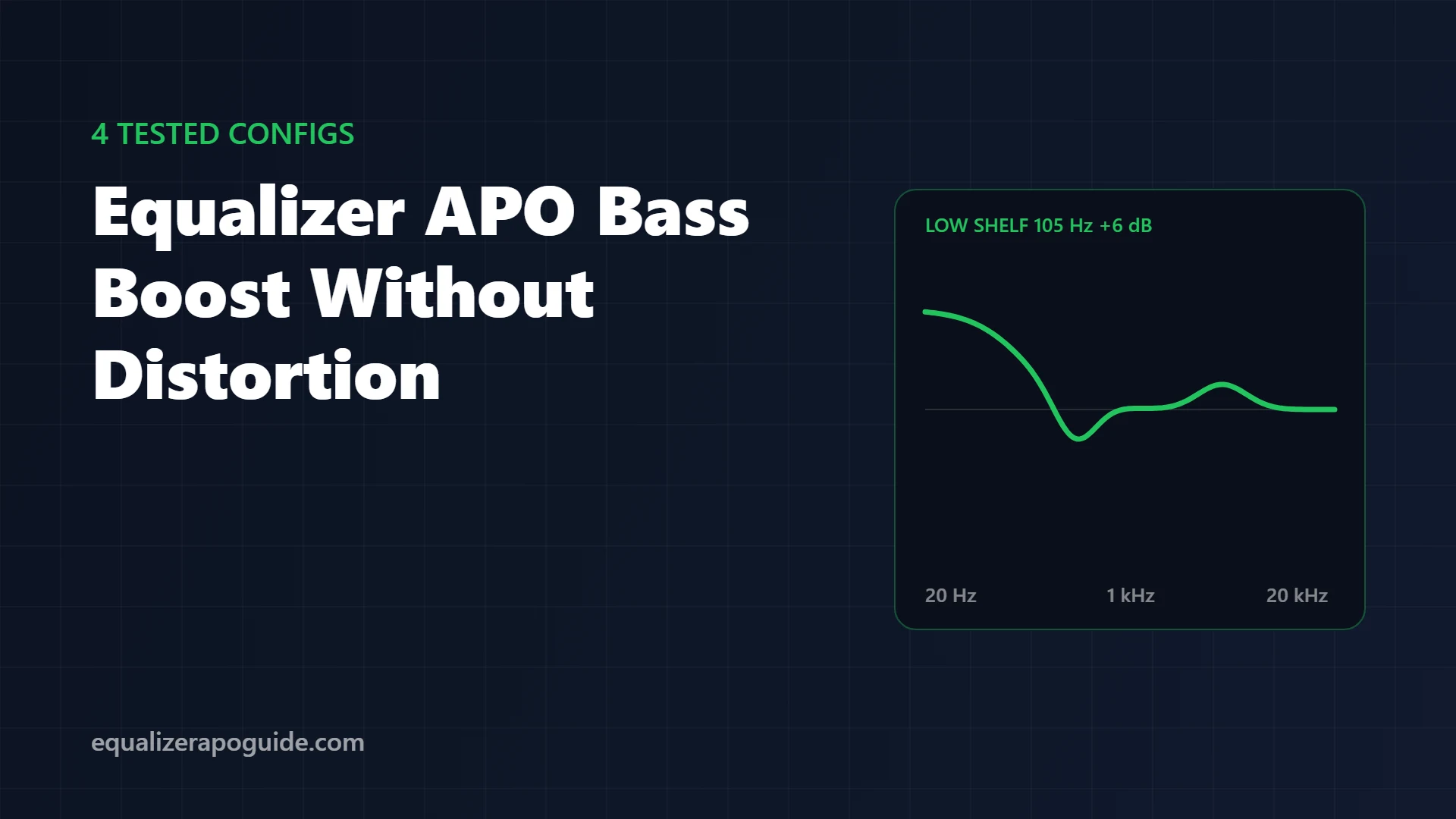
You wanted more bass. You dragged the 60 Hz slider up, and got a muddy, boomy mess that crackles every time the kick drum hits. Vocals sank. Your headphones started to sound like a cheap Bluetooth speaker.
Bass boosts fail for 3 reasons, and none of them is “not enough bass”: the boost clips, it piles up in the 200 to 300 Hz mud zone, or it asks your speaker for frequencies it physically can’t play.
Below are 4 bass configs from my tested presets, each auditioned on a Sennheiser HD 560S, a Sony WH-1000XM4 and Logitech Z200 speakers, plus the 3 rules that keep any bass boost clean. Copy, paste, done.
Jump to what you need:
🔊 Just want more bass now? Config 1: bass without mud
💥 Bass crackles or distorts? Fix clipping
💻 Laptop or small speakers? Config 4
🎧 Bass on headphones only? One device only
How to apply any config on this page
- Open
C:\Program Files\EqualizerAPO\config\config.txtin Notepad. - Delete everything, paste one config, save. It applies instantly.
- Peace users: paste and refresh, or save the config as a file and import it in Peace GUI.
Pasted and nothing changed? Equalizer APO isn’t running on that device. Run the preamp test in the setup guide first.
The 3 rules of a clean bass boost
Rule 1: Lower the preamp before you boost
Every dB of boost needs a dB of headroom. A +6 dB bass boost with Preamp: 0 dB clips on loud passages, and clipping is the crackle people blame on Equalizer APO.
Use the analysis panel in the Configuration Editor: if Peak gain reads above 0 dB, lower the Preamp until it doesn’t. The Configuration Editor walkthrough shows where to find it. Then raise your Windows volume to make up the level.
Rule 2: Cut the mud while you boost
Bass presets sound muddy because they lift everything below 300 Hz, including the region where “warmth” turns into “boom”. A small cut around 200 to 250 Hz keeps the punch and clears space for vocals. Every config below does this.
Rule 3: Boost what your speaker can actually play
Small drivers can’t move enough air for deep sub-bass. Boosting 40 Hz on laptop speakers or cheap earbuds gives you distortion and no extra bass. On small speakers, the boost goes higher (around 150 to 180 Hz), where the driver can respond.
Shelf or peak: which filter for bass?
| Filter | What it does | Best for |
|---|---|---|
Low shelf (LSC) | Lifts everything below a frequency evenly | General “more bass” |
Peaking (PK) | Lifts a band around one frequency | Targeting 808s or one weak region |
Config 1 and 2 use a shelf. Config 3 and 4 use peaks. Codes and syntax are explained in the config.txt reference.
Config 1: Bass boost without the mud
The all-rounder for EDM, hip-hop, films, and speakers with weak low end.
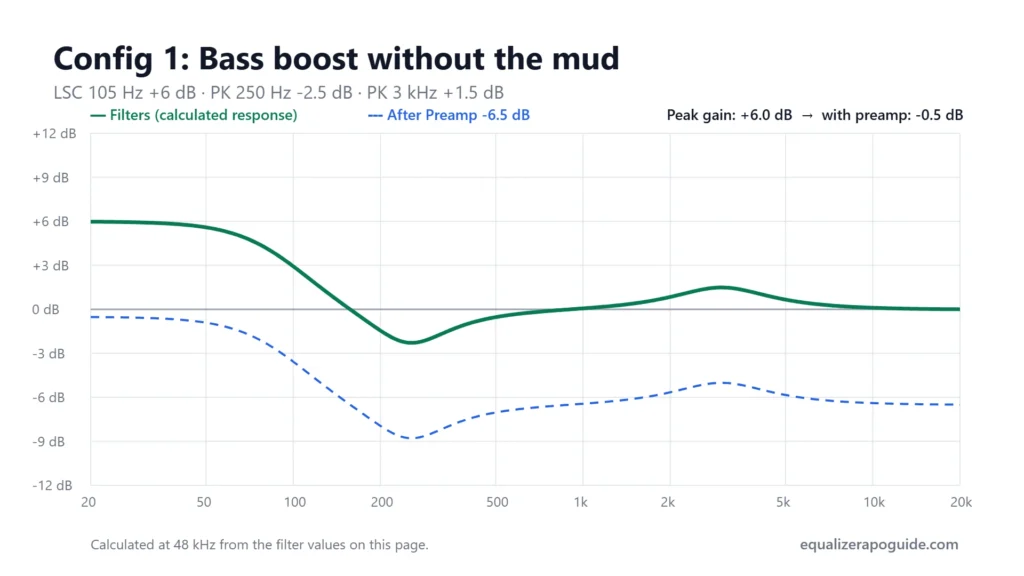
Preamp: -6.5 dB
Filter 1: ON LSC Fc 105 Hz Gain 6.0 dB Q 0.70
Filter 2: ON PK Fc 250 Hz Gain -2.5 dB Q 1.20
Filter 3: ON PK Fc 3000 Hz Gain 1.5 dB Q 1.00
The shelf at 105 Hz lifts everything below it by 6 dB. The cut at 250 Hz is the step most bass presets skip, and it’s why theirs sound muddy. The small 3 kHz lift keeps vocals from disappearing under the bass.
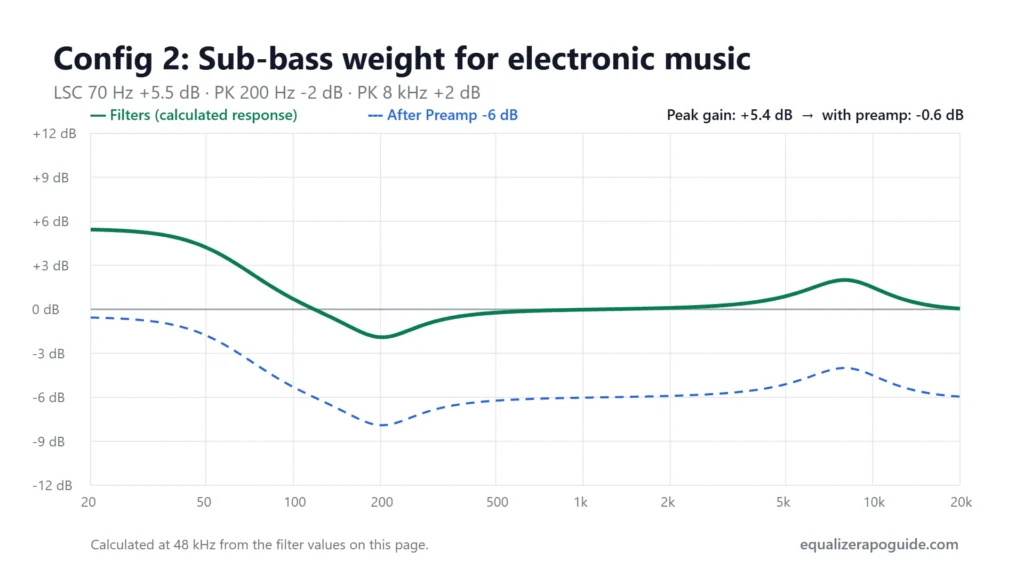
Config 2: Sub-bass weight for electronic music
Preamp: -6.0 dB
Filter 1: ON LSC Fc 70 Hz Gain 5.5 dB Q 0.70
Filter 2: ON PK Fc 200 Hz Gain -2.0 dB Q 1.30
Filter 3: ON PK Fc 8000 Hz Gain 2.0 dB Q 1.00
The shelf sits lower than Config 1 (70 Hz instead of 105 Hz), so the boost stays in true sub-bass where synth basslines live. The 200 Hz cut stops kicks from smearing into the mids, and the 8 kHz lift keeps hi-hats crisp. Best on headphones and speakers that reach down to 40 Hz.
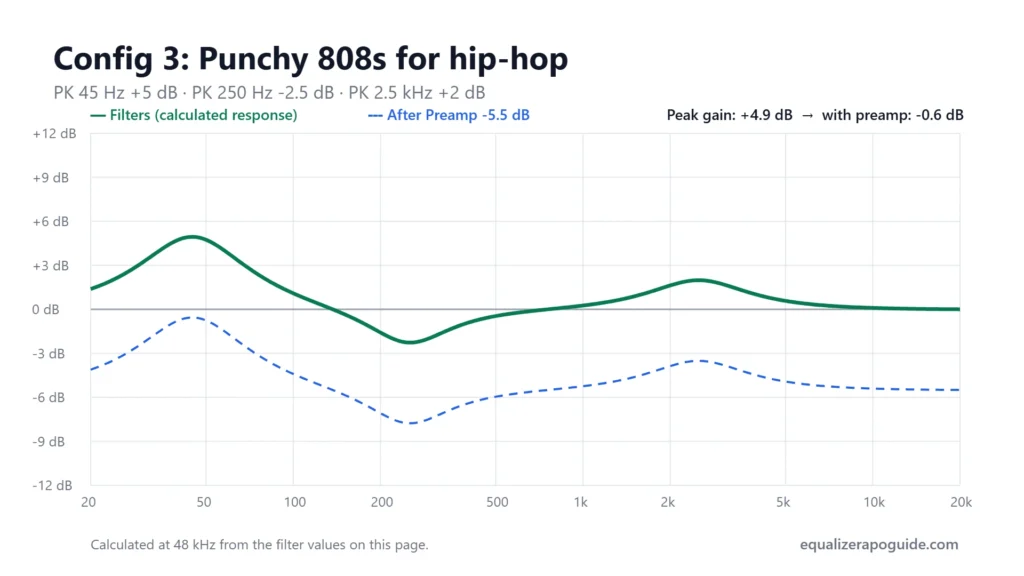
Config 3: Punchy 808s for hip-hop and rap
Preamp: -5.5 dB
Filter 1: ON PK Fc 45 Hz Gain 5.0 dB Q 0.90
Filter 2: ON PK Fc 250 Hz Gain -2.5 dB Q 1.20
Filter 3: ON PK Fc 2500 Hz Gain 2.0 dB Q 1.00
A peaking filter at 45 Hz instead of a shelf. It targets the 808 fundamental and leaves 100 to 200 Hz alone, which is what keeps this from turning muddy. The 2.5 kHz lift holds vocals above the low end.
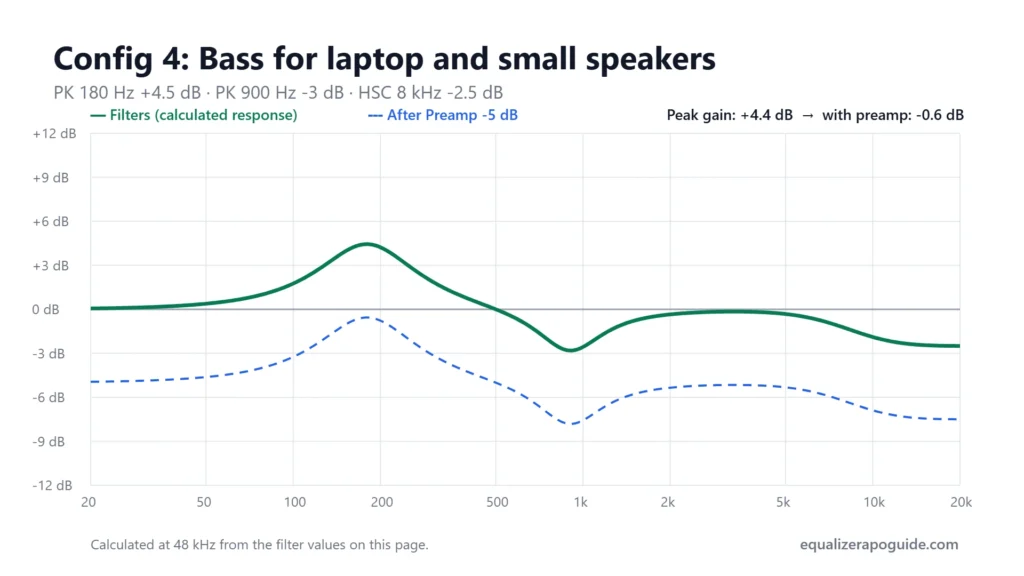
Config 4: Bass for laptop and small speakers
Preamp: -5.0 dB
Filter 1: ON PK Fc 180 Hz Gain 4.5 dB Q 1.00
Filter 2: ON PK Fc 900 Hz Gain -3.0 dB Q 1.50
Filter 3: ON HSC Fc 8000 Hz Gain -2.5 dB Q 0.70
Laptop drivers can’t produce much below about 150 Hz, so the lift goes at 180 Hz, which the driver can actually play. The 900 Hz cut removes the boxy honk of a tiny speaker in a plastic case. Cheap earbuds respond the same way; for those, move the lift down to 150 Hz.
Which config should you use?
| Your setup | Start with |
|---|---|
| Headphones, mixed music | Config 1 |
| Headphones, EDM and electronic | Config 2 |
| Hip-hop, rap, trap | Config 3 |
| Laptop speakers or earbuds | Config 4 |
| Desk speakers that boom near a wall | No boost; try the desk speaker preset on the settings page |
Bass boost on one device only
Want heavy bass on your headphones but not your speakers? Put the config under a Device: line:
Device: Headphones
Preamp: -6.5 dB
Filter 1: ON LSC Fc 105 Hz Gain 6.0 dB Q 0.70
Filter 2: ON PK Fc 250 Hz Gain -2.5 dB Q 1.20

Device: Speakers
Preamp: 0 dB
Use a word from each device’s name in Windows Sound settings. Without a Device line, a bass preset applies to every device Equalizer APO is installed on, including your microphone. That’s a common reason a voice suddenly sounds boomy on Discord.
How to tune the bass yourself
- Start from Config 1.
- Play a track you know well with a strong bassline.
- Change only the shelf gain in 1 dB steps (4, 5, 6, 7 dB) and lower the Preamp by the same amount each time.
- When vocals start to sound buried, raise the 250 Hz cut by 0.5 dB.
- Stop at the last step that sounded better. More is rarely better past +7 dB.
5 bass boost mistakes
- Boosting without lowering the Preamp. Crackle on every drop.
- Boosting 40 Hz on small speakers. Distortion, no bass.
- No mud cut. The boost buries vocals.
- Stacking presets. Pasting a bass preset under an existing preset doubles the boost.
- Testing at low volume only. Clipping shows up on loud passages; test those.
Equalizer APO bass boost FAQ
Last tested: October 2026 · Equalizer APO v1.4.2 · Peace v1.6.5.2
Hardware: Sennheiser HD 560S, Sony WH-1000XM4, Logitech Z200. Written and tested by Walter Green. Testing methodology →